How To Use the AI Mockup Maker — The Smart Way to Create Product Visuals Directly Inside WooCommerce
Hey there — Konstantin here
If you’ve ever wasted half your day trying to make your product photos look halfway decent, welcome to the club. I’ve been there. That’s exactly why I built AI Mockup Maker — a plugin that finally lets you create stunning, realistic product mockups right inside WooCommerce. No Photoshop. No templates. No “AI art gone wrong.” Just a few clicks — and the job’s done.
Getting Started
After installing and activating the plugin from wootools.io, you’ll find a new section inside your WordPress dashboard called AI Mockup Maker.
Before you start generating your first mockups, you need to activate your license or start your free trial.
If you’re new, just click Activate Trial right inside the dashboard. Enter your email address, confirm, and the 7-day free trial unlocks instantly.
If you already purchased the Pro version, simply go to the License tab, paste your license key, and activate it — you’re ready to roll.
Once that’s done, the plugin unlocks its full feature set, and the real fun begins.
Connecting to KIE.AI
To generate mockups, the plugin uses KIE.AI, the image engine behind the scenes.
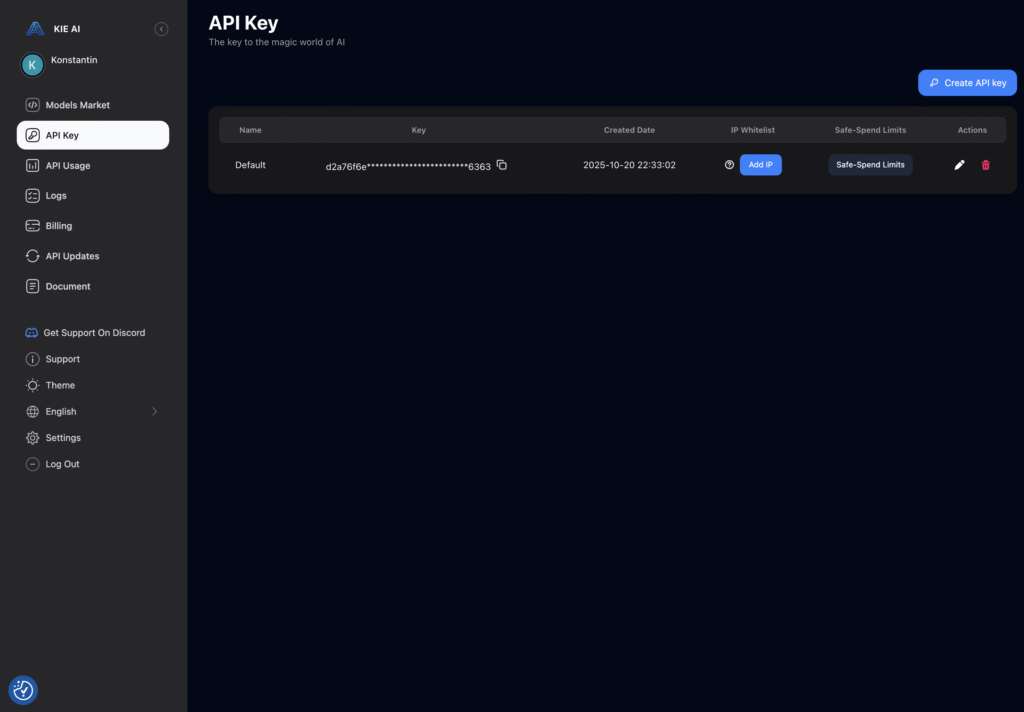
Head over to kie.ai, create your free account, and generate your personal API token.
Copy it — you’ll need it in a second.
Back in WordPress, open the AI Mockup Maker settings and paste the token into the API field.
Hit save, and that’s it. Your store is now connected directly to the AI.
Creating Your First Mockup
Now head over to your products.
You’ll see a new tab called AI Mockups inside every product page. This is where all the magic happens.
You can decide how many mockups you want to generate, and for each one, simply describe the scene you’d like to see — just in plain English.
Something like:
“A cozy lifestyle shot of this mug on a wooden table with warm sunlight and a croissant next to it.”
You can also upload one or multiple reference images. The AI uses these to make sure your mockups look like your actual product — not some random stock photo.
Then, choose the output format that fits your goal — square, vertical, wide — and hit Generate.
Each image takes roughly 10 to 15 seconds to create.
You can watch the progress in real time — a progress bar shows the rendering and displays each finished image below.
Don’t feel like waiting? No problem. You can safely close the page and keep working on other products. The AI keeps running in the background, and once everything’s ready, the generated images appear automatically in your product gallery.
If you ever want to check on your running or finished tasks, you’ll find them all neatly listed under AI Mockup Maker → Jobs.
Bonus Feature: The Pin Bot
Now for a little extra magic.
Inside the plugin, you’ll also find the Pin Bot — your personal Pinterest assistant.
It allows you to take your freshly generated mockups and instantly turn them into ready-to-post Pins.
If you connect your OpenAI API key, the bot even writes the pin titles, descriptions, and hashtags for you — fully automated through ChatGPT.
When you’re done, it exports everything as a clean CSV file you can upload straight to Pinterest.
That means hundreds of beautiful, SEO-ready Pins — with zero effort.
Why I Built This
Because honestly, I was tired of wasting hours in Photoshop just to make a mug or t-shirt look like something someone would actually buy.
Now, what used to take an entire afternoon takes about half a minute.
And watching the AI perfectly recreate your product in a real-life scene never stops being satisfying.
Final Thoughts
AI Mockup Maker takes care of the boring stuff — so you can focus on creating, not editing.
It’s fast, it’s built directly into WooCommerce, and it just works.
So if you’re still spending hours on product visuals, maybe it’s time to stop punishing yourself.
Let the AI do the heavy lifting.
Try AI Mockup Maker free for 7 days at wootools.io — your products (and your sanity) will thank you.