Hey, I’m Konstantin — founder of Wootools.io, a small but growing club for WooCommerce plugins.
When I started out, I was exactly where many small business owners are right now: trying to build an online store that actually works without drowning in tech stuff.
I’ve spent years tweaking WooCommerce, testing plugins, breaking things, fixing them again — and learning what really makes a difference. So today, I want to share five powerful WooCommerce tools that will help you run your shop smarter, faster, and better — even if you’re just starting out.
Why WooCommerce Alone Isn’t Enough
WooCommerce is amazing. It’s flexible, open-source, and free — but out of the box, it’s kind of basic.
You’ll quickly notice missing features: better filters, SEO tools, mockup creation, upsells, product recommendations… you name it.
That’s where the right plugins come in. Think of them as your power-ups — small tools that fix WooCommerce’s weak spots and save you hours of manual work.
Let’s jump straight into my top five.
1. AI Mockup Maker — Create Stunning Product Images in Seconds
If you’ve ever spent hours editing product photos, you’ll love this. AI Mockup Maker lets you create professional mockups for your WooCommerce products directly inside WordPress — in just a few clicks.
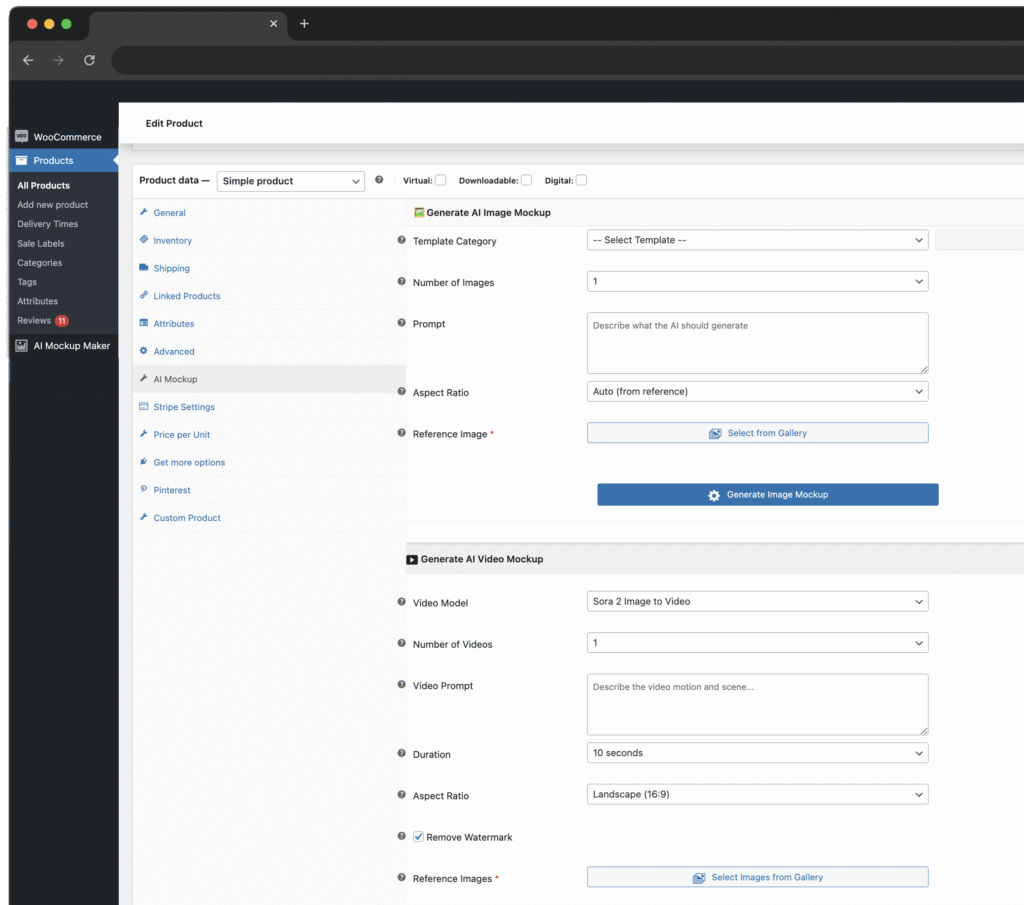
You upload your product image, describe the scene (like “coffee mug on a wooden desk, natural light”), and the AI instantly creates a realistic photo. Perfect for print-on-demand shops, merch sellers, or anyone who wants great visuals without hiring photographers.
Why it’s awesome:
- Saves tons of time — no more Photoshop marathons
- Works seamlessly inside WooCommerce
- Generates both images and short videos
- Helps you stand out on marketplaces or ads
Insider tip:
Always name your files properly (e.g. black-mug-wood-table.jpg) and fill in the alt-text field. That small SEO detail can help your products show up in Google Image Search.
2. Yoast SEO for WooCommerce — Because “If Google Can’t Find You, No One Can”
Here’s the truth: beautiful products don’t matter if nobody finds them.
That’s why Yoast SEO is a must-have — it helps you optimize every page and product for search engines.
You get instant feedback while editing (title length, meta description, readability, focus keyword) and advanced schema markup, so your listings can show star ratings, prices, and availability right in Google results.
What makes it special:
- Real-time SEO analysis as you type
- Smart schema data for product rich snippets
- Clean sitemaps and canonical links (no duplicate content mess)
Who it’s for:
Small business owners who want to get real traffic but can’t afford a full-time SEO agency.
Insider tip:
Pick one focus keyword per product and use Yoast’s templates for title and description — it keeps your whole shop consistent. Then review your performance monthly in Google Search Console. Data never lies.
3. AI Content Generator for WooCommerce — Stop Writing Everything by Hand
If content writing drains your energy, this one’s your best friend.
The AI Content Generator for WooCommerce can automatically create product titles, descriptions, short blurbs, and even meta tags using AI.
You choose the tone (fun, luxury, minimal, etc.), hit generate, and voilà — your product copy is done.
Why you’ll love it:
- Saves hours of manual writing
- Keeps your tone consistent across all products
- Helps with SEO-optimized content generation
Pro tip:
Don’t just copy-paste everything the AI writes. Use it as a base, then personalize your best-selling products. Google rewards unique and authentic descriptions.
4. Product Recommendations for WooCommerce — Turn Browsers Into Buyers
Most small stores lose money because they don’t upsell or cross-sell properly.
That’s what Product Recommendations for WooCommerce fixes.
This plugin uses smart algorithms (and even AI in some versions) to show customers related or complementary items — like “Customers also bought…” or “Complete your look”.
Why it’s powerful:
- Boosts your average order value
- Improves customer experience
- Works automatically based on data
Who it’s for:
Anyone with more than 30-50 products who wants to make the most of their existing traffic.
Insider tip:
Keep your product data clean — proper categories, tags, and attributes make recommendations far more accurate. Also, test different placements (below the product, in the cart, or after checkout) and measure which one converts best.
5. Filter Everything — Because No One Likes Searching Forever
One of the biggest frustrations in online shopping is bad filtering.
If your customers can’t find what they want in seconds, they leave — simple as that.
That’s why I recommend Filter Everything, one of the best WooCommerce filter plugins on the market.
It lets you add smart filters by color, size, price, brand, attributes — whatever fits your products.
Highlights:
- Fully customizable filters for any taxonomy
- SEO-friendly URLs for filtered pages
- Fast, AJAX-based filtering (no reloads!)
Perfect for:
Stores with large catalogs — fashion, home decor, electronics, etc.
Insider tip:
Plan your filters early. If you add attributes too late, it’s a nightmare to restructure.
And test your performance — complex filters can slow down cheaper hosting plans.
Quick Recap
Quick Recap: What These 5 Plugins Actually Do
| Plugin | Problem It Solves | Best For |
|---|---|---|
| AI Mockup Maker | Product visuals | Any store need product photos |
| Yoast SEO for WooCommerce | Search visibility | Any store wanting organic traffic |
| AI Content Generator | Writing product descriptions | Busy shop owners |
| Product Recommendations | Upsells & cross-sells | Stores with >50 products |
| Filter Everything | Better navigation & UX | Shops with big catalogs |
Pro tip: Keep product attributes clean — filters & recommendations depend on good data.
Lessons Learned
When I started, I installed 30 plugins at once — bad idea. My site slowed down and broke constantly.
Here’s what I learned:
- Less is more. Start small, test thoroughly.
- Measure everything. Use Google Analytics and WooCommerce reports.
- Keep data clean. Bad product info breaks good plugins.
Final Thoughts
Running a WooCommerce store isn’t about doing more work — it’s about using the right tools.
Start with Yoast SEO and Filter Everything to build a strong foundation.
Then use AI Mockup Maker to upgrade visuals and AI Content Generator plus Product Recommendations once sales grow.
Small stores don’t need big teams — just smart automation.
And if you want to stay ahead, visit Wootools.io — I’m building tools that make WooCommerce fun again.